

Event
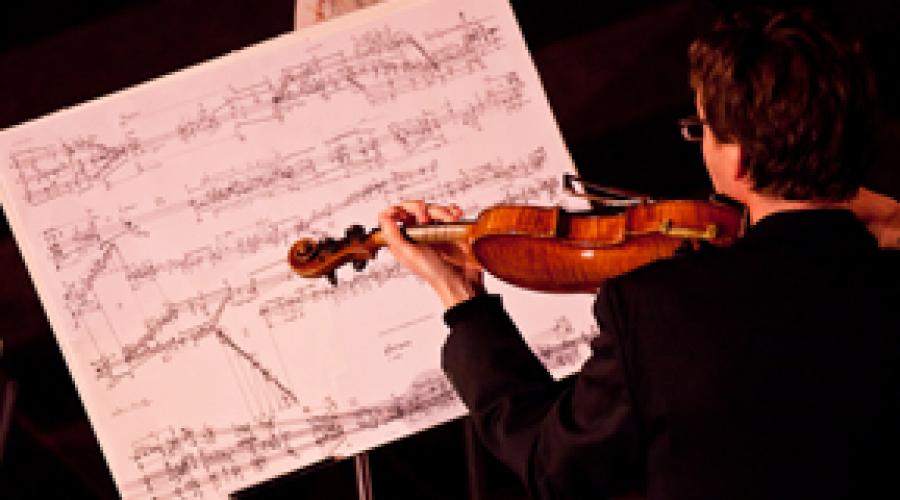
Benjamin Kreith, violin
Sun, October 14, 2012, 4:00am
Sunday, October 14, 2012 - 04:00
A look back at some items in our archives.
#Creating a Bundle
OSCBundle(uint64_t timetag = 1);
The constructor accepts a timetag which defaults to 1 (immediate).
void empty()
Empties all of the messages in the OSCBundle.
#Adding Messages
OSCMessage& add(char * address);
This project provides an OSC library for Arduino, Teensy and related embedded processor platforms. It is the most feature-rich implementation of the [http://opensoundcontrol.org/spec-1_0|OSC] encoding for these platforms.
Features:
- Supports the four basic OSC data types (integers, floats, strings, and blobs) and some common type extensions
#Overview
Get and set pin values and microcontroller state with OSC using a simplified message system.
Currently, there are controller patches made for Max/MSP, and PD.
Examples for Processing, and touchOSC are coming shortly.
Features:
- Read the analog or digital value of every pin
- Write values to the pins: LOW/HIGH (0/1) and PWM (where supported)
micro-OSC was a project of the research group at the Center for New Music and Audio Technologies, UC Berkeley.
<table border="1">
<tr>
<th>Monday</th>
<th>Activity</th>
<th>Speaker</th>
</tr>
<tr>
<td>10am - 12pm</td>
<td>Intro to Max environment; Debugging, probing; What is hidden state? Q&A</td>
<td>Jeff Lubow</td>
</tr>
<tr>
<td>12pm - 1pm</td>
<td>Lunch Break; Lunch provided</td>
<td>n/a</td>
</tr>
<tr>
Introduction:
— http://cycling74.com/docs/max6/dynamic/c74_docs.html
Please download materials from these three locations:
— https://github.com/CNMAT/CNMAT-MMJSS/archive/master.zip
— http://cnmat.berkeley.edu/downloads (External objects including the odot objects)
— http://cnmat.berkeley.edu/downloads (MMJ depot)
CNMAT Downloads page:
This site (great resource, including our free downloads, pedagogy and research overviews, events listings, member blogs, resource library and various papers published throughout the years):
https://cnmat.berkeley.edu/
CNMAT on github:
https://github.com/CNMAT/
This serves as a repository of the patches we've gone over throughout the week.
[inline-center:skiing.png]
[inline-center:grog.png]

Anytime file is changed, please rename with the convention: year/month/day e.g. 100824 for August 24, 2010. The main document list is maintained by the Music Department Sound Technician.
The Max authorizations database is currently maintained by Jeff Lubow.
Link to Jean Bresson's Open-Music Workshop presented at CNMAT in September of 2013. Excellent materials for getting started with Open Music.
http://repmus.ircam.fr/bresson/enseignement/cnmat-workshop
This workshop will introduce the basic notions of computer-aided composition and provide participants with training in the OpenMusic environment.
BNMP/ECO Student Concert Policies, Deadlines, Expectations
All pieces involving technology in Hertz Hall must have a tech rider submitted along with score and parts. Refer to Jay Cloidts instructions for preparing tech rider and stage diagram.
# Instructions (updated 4/23/2014)
CNMAT MAIN ROOM: Audio patching using dedicated laptop and Focusrite Liquid Saffire 56 interface
A permanent laptop computer is wired to the Safire audio interface. A ReadMe file (launches on startup of the computer) explains how to use it to load presets for easy analog access to the 8-channel system without using an additional computer:
Eco Ensemble protocol for programming pieces with technology.
No piece involving electronics can be programmed without first seeing the full score, mapping the full technology picture and estimated costs. The technical materials (Max patch etc.) must be fully testing all the electronic materials.
WHAT NEEDS TO BE DONE:
#CNMAT Rear Studio hard drive and backups summary (updated 5/6/14)
Drives on the Rear Studio Mac now:
• Internal Mac HD: 500GB
• Tenney External: new Glyph RAID 2TB
• New Pedagogy Archive: new Glyph RAID 2TB
• GMAX External: OWC RAID 1TB
• Sample Libraries: new Glyph RAID 2TB
• Time Machine: OWC 1TB
• (plus drive dock for floating project drives)
Time Machine backup:
Practices, policies, roles and expectations related to the CNMAT Users Group
Last updated: May 2014 (Valle)
CUG General Contact: Ravi Kitappa
CUG General Contact RAVI
CUG Technical Contact RAMA
CUG Event Coordinator AMADEUS
CUG Main Room Manager ILYA
CUG Rear Studio Manager LILY
CUG Media Lab Manager RAFAEL
CUG Semi-Anechoic Chamber Manager RAFAEL
CNMAT's expanding collection of Max/MSP/Jitter patches designed for composers, programmers, performers and music educators. The MMJ-Depot includes basic programming tips, modular programming units for copy and paste, interactive tutorials on all aspects of computer music, and functioning musical works with commentary and criticism.
Here are the rules and procedures for anyone wishing to book a concert, lecture or any kind of event in the main room at CNMAT.
MAXIMUM OCCUPANCY FOR THE CNMAT MAIN ROOM IS 50 PERSONS. PLEASE DO NOT EXCEED.
Find this as part of IRCAM's Diphone suite. I used this to make the saxophone and shakuhachi SDIF's for the Spectral Tutorials.
**PLEASE READ**
- You need to have the SDIF framework installed in order to load AddAn.
- Version 4.2J of Diphone is compatible with Mountain Lion 10.8.5
- File format: .aif files need to be physically exported to .aiff.
You can find it here: